
Why Preview.app is not enough
When image work is more than "just a quick look"
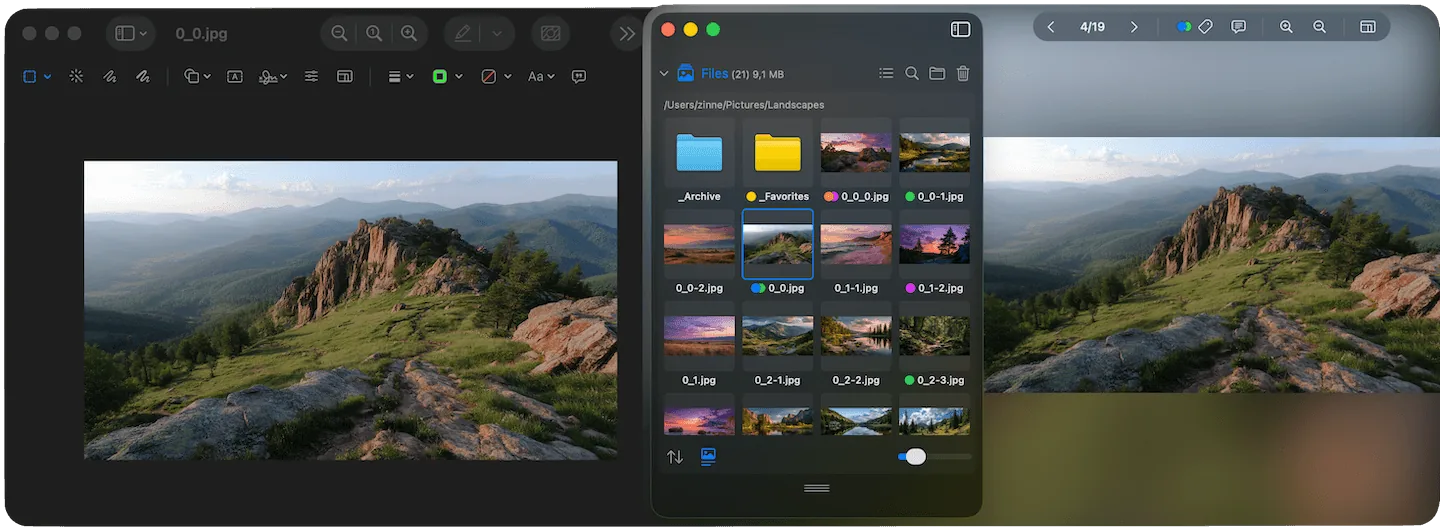
Preview.app vs. Phiewer
Preview.app is the default for many Mac users when it comes to quickly opening an image. A double-click, done. This works well for individual files – but only to a limited extent for real image work.
As soon as you regularly work with many images, the requirements change. You don't just want to see an image, but browse through folders, compare, sort out, and make decisions. This is exactly where Preview shows its weaknesses.
Where Preview.app reaches its limits
Preview is not designed as a media browser. It opens files individually and thus forces you into a linear workflow. This has a particularly negative effect when:
- • many images are in one folder
- • RAW files or mixed media are used
- • a quick overview is more important than detailed editing
The result is unnecessary clicking, waiting, and loss of context.
Phiewer thinks from the folder – not from the file
Phiewer takes a different approach. Instead of opening individual files, you work with entire folders. Images, videos, and audio files are displayed directly, without import or preparation. This creates a fluid, visual workflow.
What's particularly helpful is that you can switch between different views. See many images at once, or view a single one large – depending on what the situation demands. And if you want to check the composition, you can bring up the guides right inside the image.
Key Difference
Preview.app is a file viewer. Phiewer is a media browser. This fundamental difference determines how naturally and efficiently you can work with your images.
Conclusion
Preview.app is a solid standard tool. But as soon as image work is more than "just a quick look," it becomes clear: a fast, clear workflow is missing. Phiewer fills exactly this gap and makes file browsing something that feels natural again.