
New Composition Guides for Better Framing
Phi Grid, Golden Spiral, Diagonals, Center Cross and fine reference grids. Available in the crop tool and directly in the image view.
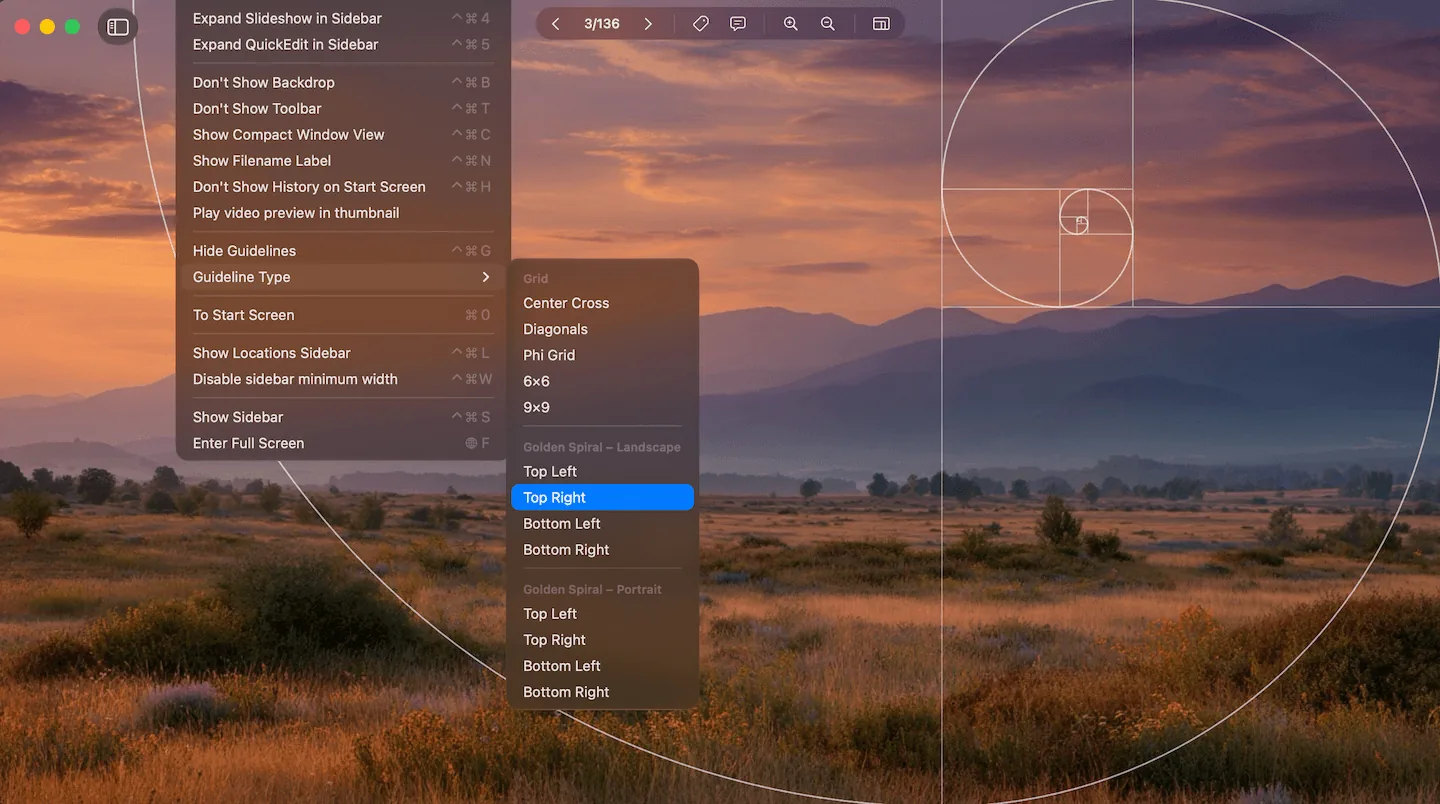
Golden Spiral shown as an overlay in the Phiewer image view
Composition is what makes an image work. When you view, compare or crop photos, clear visual reference points help. Phiewer adds a wider selection of composition guides that you can enable both when cropping and directly in the image view.
Whether you reach for a simple reference grid, the Phi Grid as a golden counterpart to the rule of thirds, or the Golden Spiral, the right overlay is one keyboard shortcut away or accessible from the menu under "Guideline Type".
The new composition guides at a glance
Under "Guideline Type" you now have the following overlays to choose from:
- • Center Cross. A horizontal and vertical line through the center of the frame. For symmetrical subjects, frontal architecture and centered horizons.
- • Diagonals. Corner-to-corner lines. They show where leading lines and diagonal elements land on the composition axes.
- • Phi Grid. Rule of thirds in the golden ratio. The lines sit at 38.2 and 61.8 percent instead of 33.3 and 66.6 percent. The four intersections are the classic power points.
- • 6×6 and 9×9. Even reference grids in two densities. For precise alignment of horizons, architecture and straight edges.
- • Golden Spiral (Fibonacci). Spiral built from the golden rectangles that guides the eye from the outside to the center. Orientation is selectable for Landscape and Portrait, in each case top left, top right, bottom left or bottom right. That way the spiral can be matched to any subject.
Phiewer now covers the common composition rules, from classic symmetry through the rule of thirds all the way to the Golden Spiral.
Guides in the image view and in the crop tool
The guides are available in both views: in the crop tool while cropping and in the image view while looking at a photo. A keyboard shortcut (Ctrl+Cmd+G) toggles them on and off; the guide type is chosen in the menu under "Guideline Type".
Especially when simply viewing photos this makes a real difference. You see immediately whether the horizon sits on a composition line, whether a portrait falls on a power point of the Phi Grid or whether the diagonals of an architecture shot are truly aligned, without altering the image.
Why composition guides matter when viewing
Composition guides are not just a tool for shooting or post-processing. They are just as valuable when viewing and analyzing images. If you want to understand why a photo works, the right overlay gives you the answer at a glance.
For photographers who want to learn to compose more deliberately, the new overlays are a valuable learning tool. Place the Golden Spiral over a photo you find particularly strong and you immediately see the underlying compositional principle.
Composition right inside the image viewer
Phiewer is more than a fast image viewer. With the new guides the image view becomes a tool for a trained eye. Check composition without switching apps.
Update Now
The new composition guides are available as a free update for all Phiewer users on the Mac App Store.